 VenueWS
Built for venues, clubs, galas and private events
QR invitations.
Instant door check-in.
Invite your guests, let them RSVP from their phone, and check them in with one scan. No hardware, no app for guests, no line at the door.
- Free plan: events up to 50 seats, every feature
- Set up in 5 minutes
- English & Spanish
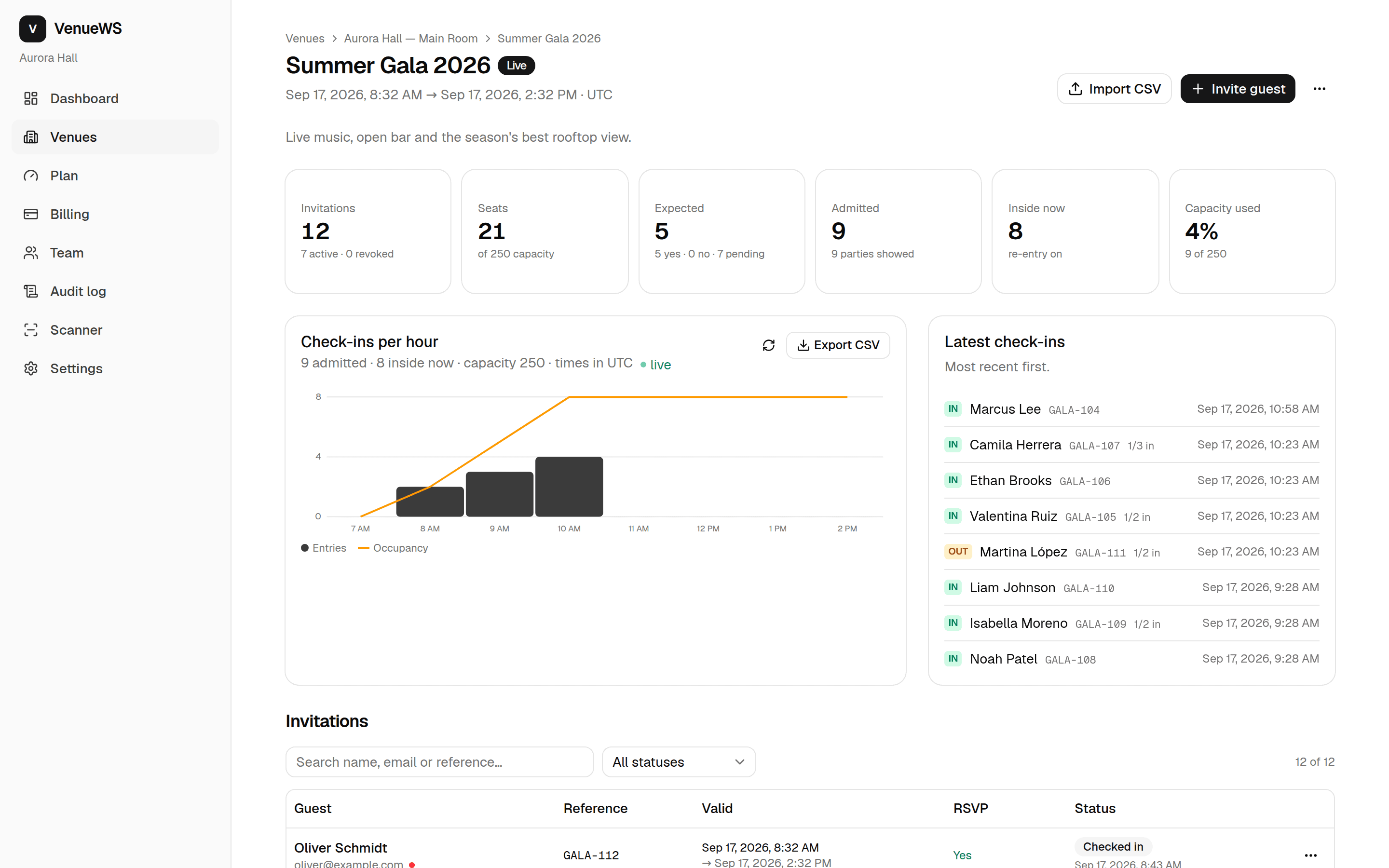
Three steps. Zero friction at the door.
Everything runs on the web: your backoffice, the guest's invitation and the scanner. Nothing to print, nothing to install for guests.
Invite
Add guests one by one or import a CSV. Each invitation gets a signed QR, a personal page and — if you want — an email.
Guests RSVP
Guests open their page, confirm who's coming and keep the QR on their phone. Reminders go out the day before.
Scan at the door
Staff scan with any phone. Green means in. Duplicates, expired or wrong-venue codes are refused instantly.
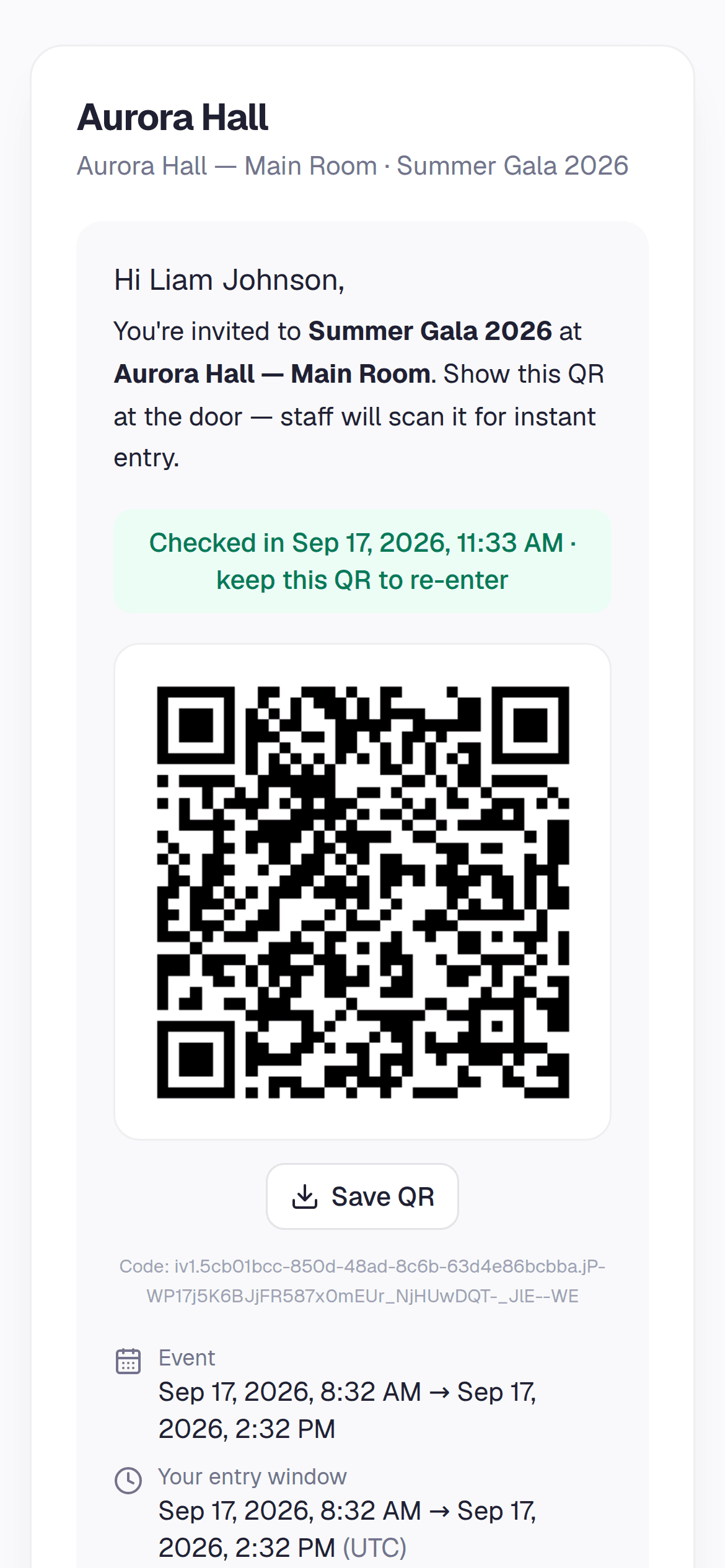
The guest side is a link, not an app
Every invitation has its own page: the QR, when and where, and one tap to confirm. Share it by email, WhatsApp or SMS straight from the backoffice. It works offline once opened and in the guest's language.
- RSVP with party size
- Save the QR to the phone, or to Apple and Google Wallet
- Accepts the event's waiver before the QR appears, when there is one
- Shows "already used" or "expired" so the guest knows before the door
- Cancel an invitation and its QR stops working immediately
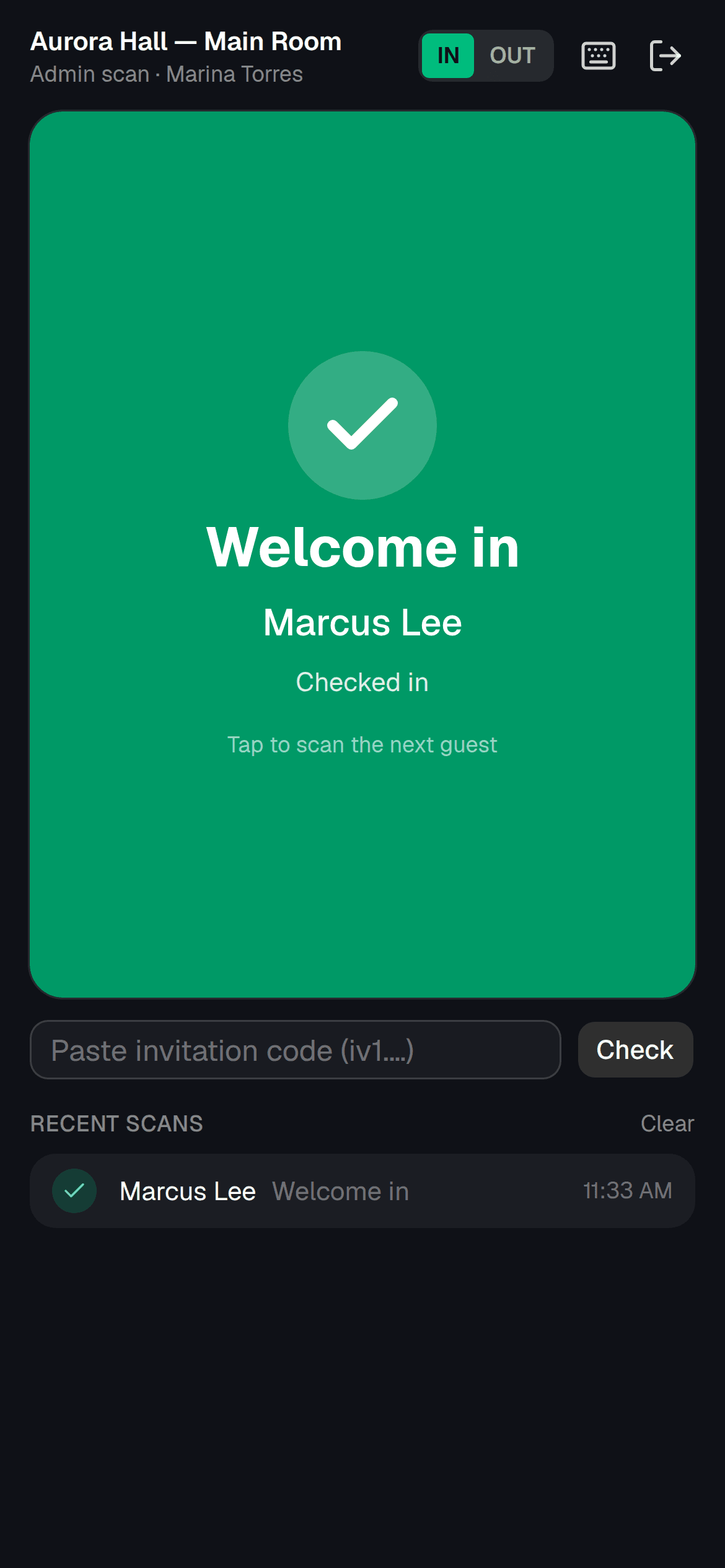
The scanner
Any phone is a door scanner
Pair a phone with a one-time code, or scan straight from an admin account. Big green or red result, a beep, and the next guest — that's the whole workflow.
- Camera or manual code entry
- Offline queue that syncs later
- IN / OUT mode for re-entry
- Party counters: "2 of 4 inside"
- Takes a waiver signature at the door
- VIP greeting, blocklist refusal
Seating
Seat a wedding in minutes, not an evening
Every table is drawn as a ring of seats, so you can see where there is room. Drag a party over and the board tells you whether they fit before you let go. A party bigger than the gap fills what fits and the rest stays on the list — no dialog, no arithmetic.
- Tables come in with the CSV or the sheet, and can change after the invitations have gone out
- The door sees the table on the scan and sends the party straight to it
- Place cards, table cards and a seating chart print from the browser
- “Auto-seat the rest” does the boring half for you
0 of 15 seated
Try it — drag a party onto a table, or tap one then tap a table. Nothing is saved.
- TGThe Garcíasparty of 4
- ALAna & Luisparty of 2
- MFMarco's friendsparty of 5
- SSofía1 seat
- TRThe Rossisparty of 3
Head table
0 of 4
- Drop here
Table 2
0 of 6
- Drop here
Table 3
0 of 8
- Drop here
Floor plan
Draw the room. Let them pick the table.
Start from a banquet, gala, club, wedding or conference and the stage, bar, dance floor and tables are already there. Split the room into VIP, vendor and tiered sections with their own colour and rules. Then let guests choose their own table from the invitation on their phone — with an optional seat fee for the sections you decide.
- Ten templates to start from — banquet, gala, club, wedding, conference, themed party, quinceañera, cocktail, dinner show, festival — and the room saved per venue to start the next event the same way
- Sections for VIP, vendors, staff and tiers; a table belongs to whichever section it sits in
- Stage, DJ, bar, buffet, dance floor, entrances and notes, so “the one by the stage” means the same thing to everyone
- Guests pick a table for their whole party, change it until the event starts, and see the seat fee before they confirm
- Everything you place here shows on the seating board and the printed chart
Your invitation
Choose your table
Party of 2 · pick any table with room in an open section.
- VIP$25/seat
- Generalopen
- Vendorsassigned
The organiser decides which sections guests may pick from and what a seat costs there; fees are recorded on the guest and collected by you.
Run the whole night from one screen
What's live, who's inside, who's expected and what happened last week — without spreadsheets.
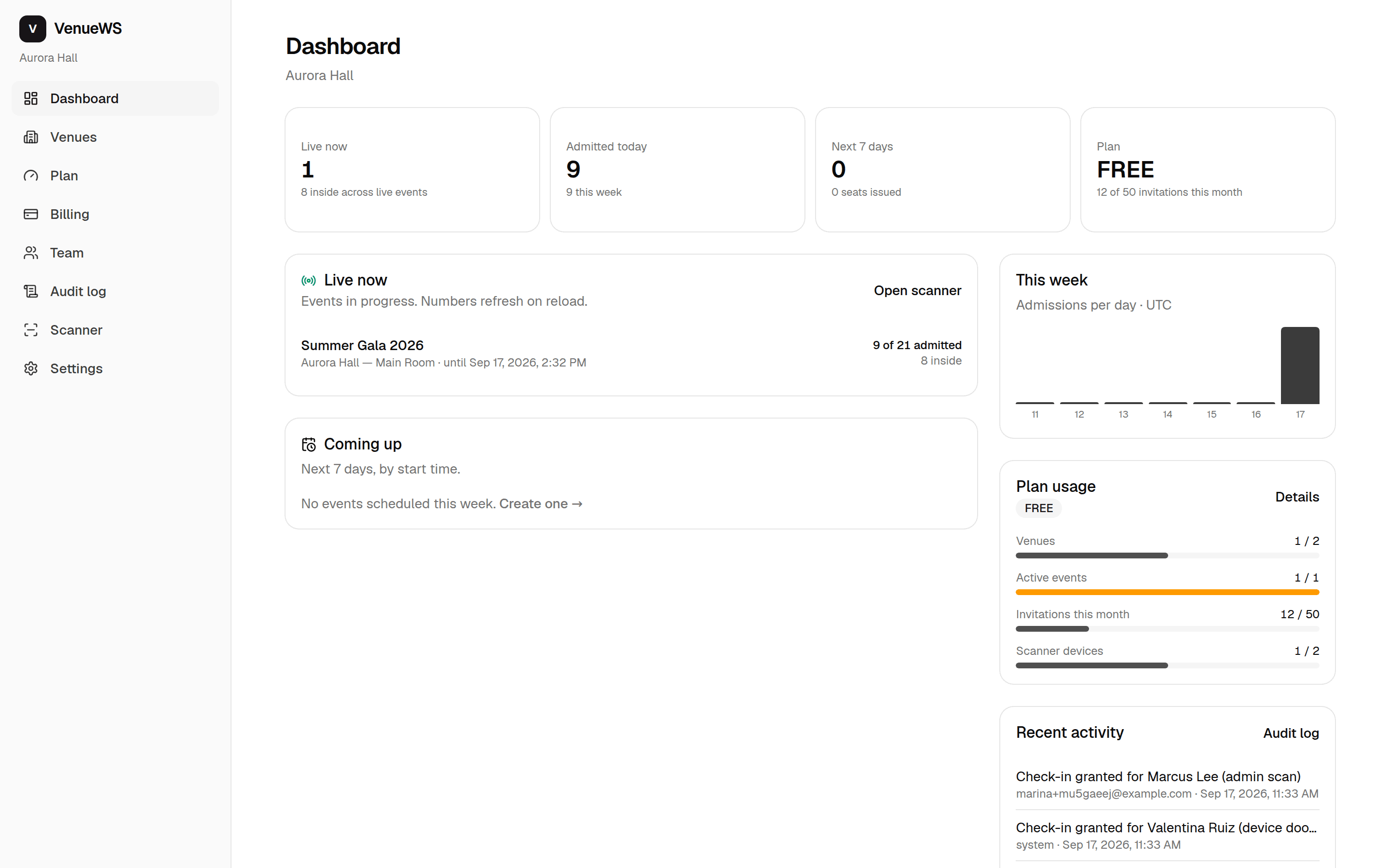
Parties of any size
One QR can admit a party of any size — the scanner counts them in one by one.
A seating board you can drag
Unseated guests on one side, your tables on the other. Drop a party of five on a table of four and four sit there — the fifth waits for the next table. The door sees the table on the scan.
Paper for the night itself
Print table cards, place cards and a seating chart for the staff who have no login. Your browser's print dialog, so "Save as PDF" is right there.
Waivers, signed before the door
Write a release or house rules once; require it per event. Guests accept with their name before the QR appears; the door refuses anyone who hasn't, or takes the signature on the spot. The exact text, name, time and address are kept — CSV or PDF.
A registration link, not a guest list
Open an event to the public with one link. Guests register themselves, get their QR at once or after your approval, and you cap the party size.
The door never says no for a billing reason
Go past your plan on a big night and guests still walk in. The extra is on next month's invoice. A queue stopped by an invoice is not something we will ever ship.
Capacity, re-entry and several doors
Cap an event, get "sold out" when issuing and "at capacity" at the door. Let guests step out and back in. Split a venue into zones — main entrance, VIP, parking — each with its own cap and its own scanners.
Live attendance
Check-ins per hour, occupancy, no-shows and a CSV export. A summary lands in your inbox when the event ends.
Works without signal
The scanner is an installable app that keeps scanning offline and syncs when the door has coverage again.
Reminders, automatically
Guests with an email get their QR again 24 hours before, with a one-tap confirmation.
Guests you know
Everyone you've ever invited or admitted, across events. Mark a regular VIP so the door greets them by name, or block someone so the door turns them away — every time.
Your brand, your language
Your logo, your colour and your reply-to address on every invitation, guest page and email. Your team picks English or Spanish; guests get yours.
Your guest list probably already exists
Bring it in rather than retyping it, and push check-ins back out to whatever you already run.
Eventbrite
Connect an event and its attendees arrive as invitations, kept in sync.
Google Sheets & CSV
Import a sheet — names, emails, party size and table — and re-import it when it changes without losing seating.
Zapier and Make
Check-ins, RSVPs and new invitations as triggers; issue invitations as an action.
Webhooks and a REST API
Signed webhooks for every scan, and an API key for your own system.
Apple and Google Wallet
Guests keep the pass in their phone's wallet, table included.
WhatsApp and email
Invitations and 24-hour reminders, in the guest's language.
For speakers, coaches and authors
Fill the room, check them in, and sell the book.
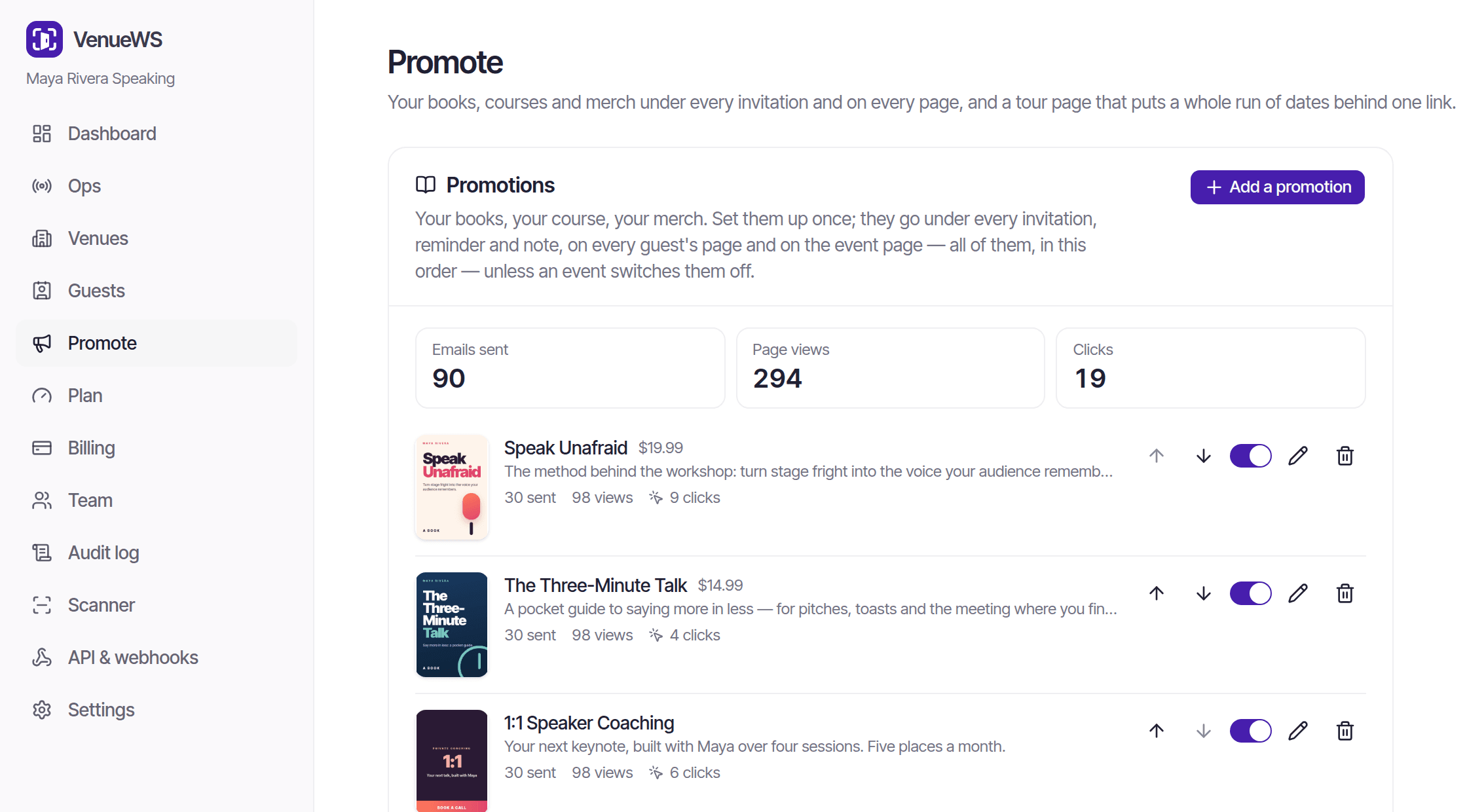
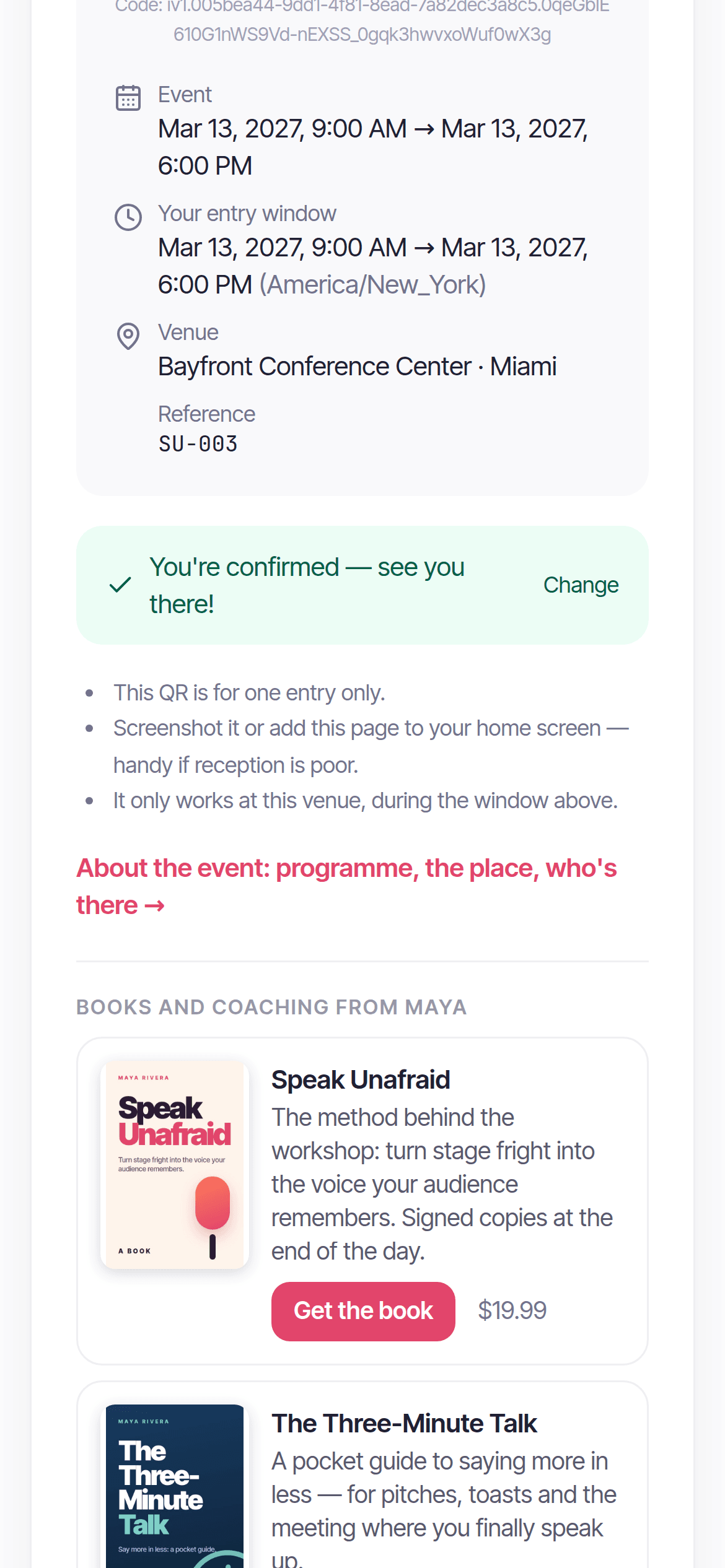
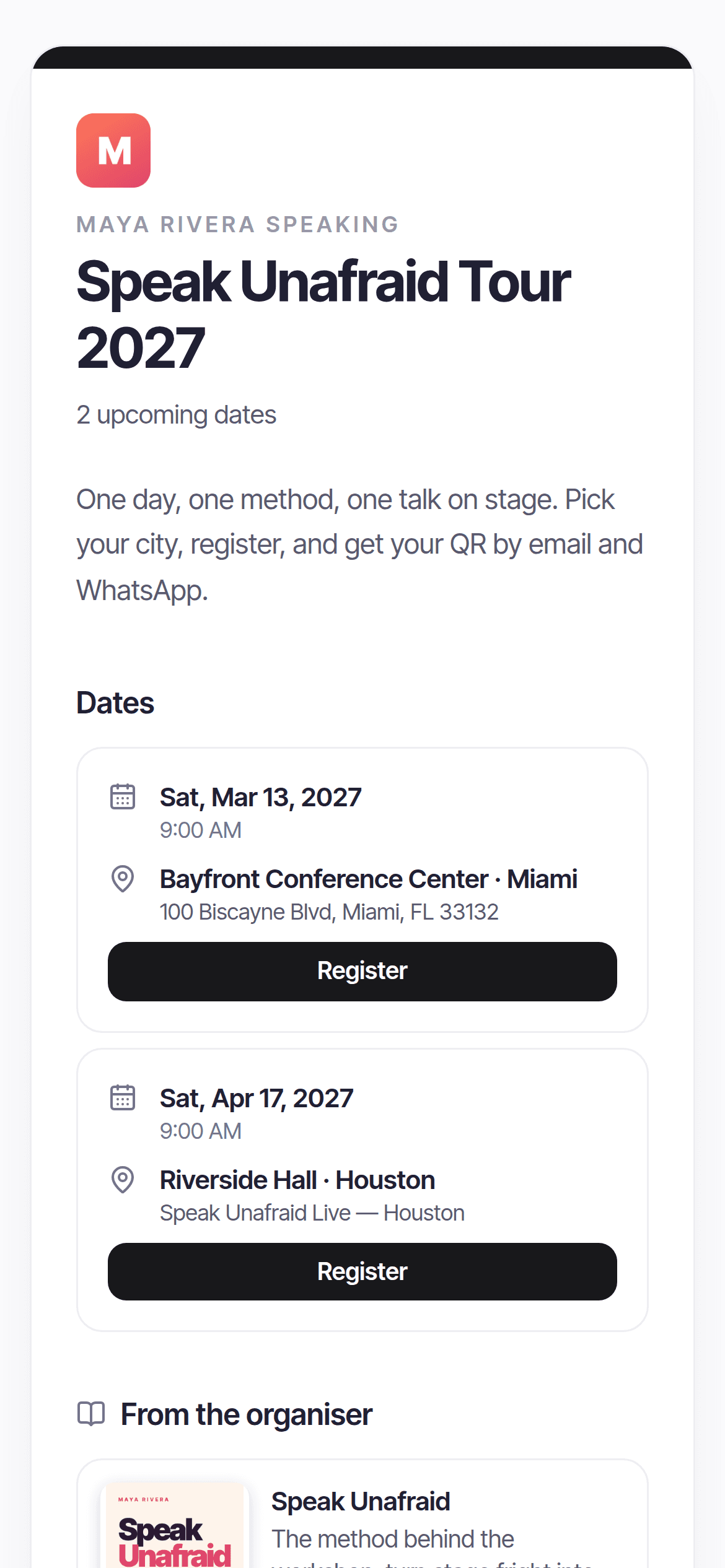
Workshops, certifications and speaking tours: a registration page per city, a photo release signed before the door, and your books and coaching in every invitation, reminder and guest page — with the clicks each event brought.
- Your books in every message. Set them up once; they appear under every invitation, reminder and note and on every guest page, with sends, views and clicks per book.
- Speaking tours. Copy one city to the next and share a single tour page with every date and its own registration.
- Photo and recording releases. Consent before the QR appears, kept as CSV or PDF. Missed it? They sign at the door.
- Bring the list you already have. CSV, Google Sheets, Eventbrite, or a Shopify orders export — paid orders become invitations.
Built for the way you run events
Speakers & coaches
Fill the room, check them in, and sell the book.
Learn moreWorkshops & seminars
Registration, reminders and check-in for every session.
Learn moreConferences
Several doors, one live count.
Learn moreWeddings
RSVPs, seating and a welcome table that knows every name.
Learn moreQuinceañeras
The whole family invited, seated and welcomed.
Learn moreGalas & fundraisers
Sponsors seen, VIPs greeted, the door calm.
Learn moreClubs & nightlife
The list at the door, not on a clipboard.
Learn moreEvent venues
Every event in your room, one guest list, one door.
Learn moreEvent planners
Every client's guest list, done — and a share when they use it.
Learn moreOne product. Three ways to pay.
Every plan has every feature — doors, floor plan, waivers, WhatsApp, the lot. You only pay for seats: one seat is one invited person. Pay never, per event, or per year.
Free
$0
Everything to run small events. Forever.
- Events up to 50 seats
- 100 seats a month
- 1 live event at a time
- 2 team members · 2 scanner devices
- “Powered by VenueWS” on invitations
Per event
from$59per event
One event, paid once. No subscription, no monthly fee. Floor plan and self-seating included.
- Up to 150 seats · $59
- Up to 300 seats · $89
- Up to 500 seats · $129
- Up to 1,000 seats · $219
- Up to 2,000 seats · $379
- Up to 3,500 seats · $599
- Grow it later, pay only the difference
- 5 scanner devices · 5 team members
- No VenueWS branding — your name only
- Floor plans and guests choosing their table
- Waivers and e-signatures
- AI vendor research
- Refundable until the first invitation goes out
Pro · yearly
Best value$1,290per year
12,000 seats for the year, one pool — about $108 a month.
- Everything — doors, floor plan, self-seating, waivers, WhatsApp — 12,000 seats a year
- Then $0.20 a seat, billed after the fact — never refused at the door
- Unlimited live events
- 3 venues · 10 team members · 10 scanner devices
- No VenueWS branding — your name only
- API and webhooks
- Floor plans and guests choosing their table
- Waivers and e-signatures
- AI vendor research
- Sponsorships across events and sponsor reports
- Passes bought this year count toward it
- Saves 17% against monthly
Enterprise
from$3,499per year
Unlimited everything, quoted for your venues.
- Unlimited venues, events and guests — no per-guest overages
- Unlimited team members and scanner devices
- Every feature: floor plans, waivers, WhatsApp from your own number, Zoom, API and webhooks
- No VenueWS branding anywhere
- Custom integrations with your ticketing platform or CRM
- Guided onboarding and staff training
- Priority support
- Pay yearly or quarterly, by bank transfer or card
Add-ons
For the one night that needs a little more. Bought from the Billing page, active the moment you pay.
Extra scanner (one event)
$15
One more scanner device for a single event — for the VIP door or a second entrance
- · Valid for the event you pick
- · Active the moment you pay
- · Add several at once
1,000 invitation pack
$129
A thousand more invitations this month, without changing plan
- · Added to this month's allowance
- · Active the moment you pay
- · Buy more than one pack
What would a year cost me?
Per event · $534 a year · $89 per event
Saves $756 vs Yearly. One pass for a 250-seat event is $89. Yearly beats passes from 15 events a year. $0.36/seat.
The door never says no for a billing reason. Go past your allowance on a big night and guests still walk in. The extra is $0.20 a seat on the next invoice.
Prices in USD through PayPal. Cancel a subscription any time from the Billing page and keep it until the period you paid for ends. Full pricing details
Your guest list is yours
We process it on your instructions and never sell it, share it or use it to train anything. The Data Processing Addendum says so in writing.
Revocable by design
Every QR is a signed token checked on our servers and killed the moment you revoke it. A screenshot admits a party once.
Who saw what, on the record
An audit trail of every invitation issued, setting changed and guest admitted, with the door and device that did it.
Questions
- Do guests need to install anything?
- No. The invitation is a web page with the QR on it; a screenshot works too. Only your door staff install the scanner, and even that is optional — it runs in the browser.
- Can guests pick their own table?
- Yes. Draw the floor plan — or start from a template — mark which sections guests may choose from, and set a seat price on a section if you want one. A guest opens their invitation, sees the same plan you drew, and takes a table for their whole party; they can change it until the event starts or until you seat them yourself. Seat fees are recorded on the guest and collected by you, and you mark them paid from the seating board.
- Can it handle seating for a dinner or a wedding?
- Yes — each invitation carries a table, and the door sees it on the scan, so whoever is greeting can send the party straight to their seats. Tables come through the CSV import too, and can be changed after the invitations have gone out.
- Can I make guests sign a waiver?
- Yes. Write it once in the venue's settings and require it per event. A guest sees the text where the QR would be and accepts with a checkbox and their typed name; until then the door refuses them, and staff can take the acceptance on the scanner itself. Every acceptance keeps the exact text shown, the name, the time and the connection's address, downloadable as a CSV for the event or a PDF per guest. Whether your text holds up is between you and your counsel — we keep the evidence.
- Can guests register themselves?
- Yes. Turn on public registration for an event and share its link — on a story, a flyer, a WhatsApp group. Guests register, get their QR straight away or wait for your approval, and the same email always gets the same invitation back rather than a second one.
- Does it work for a weekly night?
- Yes. Set an event to repeat daily or weekly and the next date is created as the current one ends, with the same settings, seating, zones and registration — only the date changes.
- Can I use my own scanner devices?
- Yes. Pair any phone or tablet with a one-time code from the venue settings. Signed-in admins can also scan straight from their account.
- What happens if a QR is shared or screenshotted?
- Each QR admits its party once. A second scan is refused with "already used" and staff see when the first entry happened.
- How is billing handled?
- Through PayPal. Pay per event with a pass, or monthly or yearly with a subscription — same features either way; you only pay for seats. Upgrade, downgrade or cancel from the Billing page; if you cancel you keep your plan until the period you've paid for ends.
- I only run a couple of events a year. Do I have to subscribe?
- No. Buy an event pass for each one — priced by seats, from $59, every feature included, no monthly fee. If the event grows you pay only the difference, and if you end up running many, the passes you bought count toward a yearly plan.
Your next event, without the line at the door.
Create your workspace, add a venue and send the first invitation in five minutes.